
Showing posts with label canon 5d mk 2. Show all posts
Showing posts with label canon 5d mk 2. Show all posts
5 Dec 2011
Instrumental and video 'Monster Shark'
Think of this as a audio and visual version of an abstract painting.
A quick weird instrumental I recorded on the spot and a quick video I made to accompany it. This was my first attempt at a video and it's all from my archive footage I had on my hard drive.
No it is not in time, no the guitar and everything else isn't played well but thats the fun of it, I tried to create a mood.
I really want to get more into shooting video and films in the future, really find it fun and I love the process. I hope to do some collaborations with other artists and film makers also, I love collaborating with people and creating something that you ever could on your own.
www.drewportfolio.com
andrew@drewportfolio.com

18 Aug 2011
World War Z Movie Set
Just took a wander round the World War Z film set which right now is filming with Brad Pitt in Glasgow. Loads of yellow taxis, Philadelphia police cars, road signs and props like newspaper stands and stuff. I took a few photos. Cool to see how they transformed the area and it's good to have a bit of buzz about the area. Hope things like this happen more often.


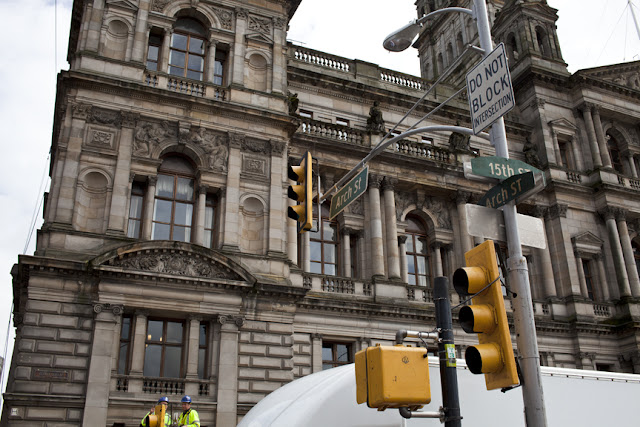


15th Street

15th Street through the crowds.

Arch Street and workers setting up more lights on the other side of the road.

Where the filming at this point was going on.

Hot Dog stand props.

J F Kennedy Bl

J F Kennedy Bl

I love the look of these yellow lights and signs.

Market Street

Philadelphia Police car


News stand props.


Working away at the lights.
andrew@drewportfolio.com
Places to follow me online:
20 Jun 2011
Making The Most Of One Location & LumoPro 160 Speedlight Review


Studio portraits of Cat.
Cat and I love to just play around and experiment with lights in our small home studio when we're bored. Above is two shots from one of our recent sessions.
Looking at these shots you can instantly see that they are very different, one is quite natural with my LumoPro 160 speedlight used to softly light the face combined with a shallow depth of field (50mm at f1.4 if I remember correctly) focussed on the eye's to give a really nice, soft, beautiful portrait (headshot kind of vibe) and the other is very harsh with the LumoPro used to blow almost everything out, resulting in a raw, hard and edgy outcome with a nice bit of attitude thrown in. These images were taken within seconds of each other, I just changed the aperture, flash power and my viewpoint while staying in the same spot to create a completely different picture with a completely different feel. In the first image I am standing more above her looking down to get the wood floor texture in the background giving a innocent and soft quality to the overall image, on the second I just bent down to her eye level, asked her to pull her hair back while staring down the camera (she is sitting on the floor for both images). I am a big advocate for being able to get the most out of one spot rather than having to change location constantly and I feel that practicing this can help you become a much better photographer, it keeps you on your toes. Sometimes on shoots you don't get the luxury of great locations and have to work with what you've got so being able to make the most of your surroundings is a very valuable skill.
I have wanted to do a short review of the Lumopro 160 for a while. So here it is.
To be honest there isn't really that much to say. It simply is a great flash. If you want to get into off camera lighting and are not worried about TTL controls then this in my opinion is the best option out there. It gives the same power as Nikon or Canon's highest models at much less of a price. I payed £130 for mine and could not be happier, I like to work manually with my flash settings to maintain full control of the situation and this unit is perfect for this. I have had no problems with it and can't think of a bad thing to say.
So if you are looking into off camera lighting and don't need the power of a strobe or TTL controls then I would highly recommend taking a look at this LumoPro 160. Also if you haven't already then check out http://www.strobist.blogspot.com/ this site will help get you well on your way in the world of flash, this is where I first heard about the LumoPro 160 and off camera abilities.
http://www.drewportfolio.com/
andrew@drewportfolio.com
30 May 2011
DIY DSLR Shoulder Rig
DIY DSLR Shoulder Rig from Andrew Kelly on Vimeo.
A quick video showing the DSLR shoulder rig I built for my 5D mark 2. I wanted to start shooting video with the camera and needed some extra stability, so rather than spend a hell of a lot of money on a well over priced pro one I decided to try and build my own. This is the result.
I had to use the mic on my camera to record this as my Zoom H1 is broke so the sound isn't great.
Click 'read more' to see images and more of the building process (Taken from my previous blog post on this rig)
9 Jan 2011
DIY DSLR Shoulder Rig
Now have a new video blog post explaining more about this rig here
This is some of the process me and my dad went through while building me a shoulder rig. All in all the materials cost around £40 (thats including the tripod head). We intentionally decided not to use the standard 15mm rods to base the system on as I wanted to have everything home made and don't intend to buy any pro pieces to attach. I will also attempt a follow focus system soon.
It is based on a single aluminium sheet about 2 inches wide as it is nice and light. The handles are simply bike handles (I will buy a few different styles to suit different projects).
We then sprayed everything black.
I like that everything is adjustable to my needs. All I need to do is make some more screw holes if I need to attach any other pieces of equipment (follow focus, sound recorder).
I am very happy with it. It gets a very steady shot which is the sole purpose for making it, it is light, can be easily taken apart for storage and re-assembled, it cost at least £400 less than a store bought rig, easily adjusted to my needs and projects. Overall pretty damn good for around £40.


Final Rig.
It was sprayed with a grey primer then finished with a satin black.
I added a small bag at the back with 5 pounds of weight to balance out the whole rig and take the strain of my arms. The whole rig with the Canon 5d mk 2 on it feels great and is a pleasure to use.
Only thing left to do is buy some black tiers to attach the weight bag in place of the red one's (purely aesthetic reasons) and buy some different bike handle bars for different needs and projects.
Now I plan to make a few different styles of rig to compliment this one (some more run and gun styled one's). I will also attempt a follow focus for this one.
A big thanks to my dad for helping me with this!
www.drewportfolio.com
andrew@drewportfolio.com
This is some of the process me and my dad went through while building me a shoulder rig. All in all the materials cost around £40 (thats including the tripod head). We intentionally decided not to use the standard 15mm rods to base the system on as I wanted to have everything home made and don't intend to buy any pro pieces to attach. I will also attempt a follow focus system soon.
It is based on a single aluminium sheet about 2 inches wide as it is nice and light. The handles are simply bike handles (I will buy a few different styles to suit different projects).
We then sprayed everything black.
I like that everything is adjustable to my needs. All I need to do is make some more screw holes if I need to attach any other pieces of equipment (follow focus, sound recorder).
I am very happy with it. It gets a very steady shot which is the sole purpose for making it, it is light, can be easily taken apart for storage and re-assembled, it cost at least £400 less than a store bought rig, easily adjusted to my needs and projects. Overall pretty damn good for around £40.


Final Rig.
It was sprayed with a grey primer then finished with a satin black.
I added a small bag at the back with 5 pounds of weight to balance out the whole rig and take the strain of my arms. The whole rig with the Canon 5d mk 2 on it feels great and is a pleasure to use.
Only thing left to do is buy some black tiers to attach the weight bag in place of the red one's (purely aesthetic reasons) and buy some different bike handle bars for different needs and projects.
Now I plan to make a few different styles of rig to compliment this one (some more run and gun styled one's). I will also attempt a follow focus for this one.
A big thanks to my dad for helping me with this!
www.drewportfolio.com
andrew@drewportfolio.com
16 Nov 2010
Memory tree by Mike Kobal.
Another great movie clip shot with the 5d mk 2. I really like the use of depth of field in this and also the colour correction. It has an eerie feel to it.
Great work by Mike Kobal.
Watch full screen.
Great work by Mike Kobal.
Watch full screen.
g. (An amazing short film by J. Xavier Velasco)
Found this on vimeo the other day and I was blown away. It engrossed me from the first second to the last. It was shot so well and just sucked you into the story. The creator J. Xavier Velasco states that it was shot all hand held with a canon 5D mk2 and a few lenses and virtually no budget. Shows what can be achieved when you have vision and creativity. This puts a lot of big budget movies to shame in my opinion. I loved the hand held aesthetic, I am not a fan of complete precision and the slight hand shake in this only adds to the feeling, atmosphere and narrative. I think that if this was shot using steady cams, glide cams and other expensive gear it would not have had the same impact (well on me anyway).
Watch this and see what great vision and creativity can achieve.
Watch it full screen for full impact.
Watch this and see what great vision and creativity can achieve.
Watch it full screen for full impact.
g. from J. Xavier Velasco on Vimeo.
Subscribe to:
Posts (Atom)